How I am authoring notes
These notes are authored using Obsidian Markdown.
This is more-or-less a fancy notes editing program that works on flat markdown files.
What I was doing before
I was previously using Visual Studio Code for the same, but this is more ergonomic.
The editor integrates nicely with my Android phone, and can be synced using any cloud sync solution, or none at all.
And, for a nominal fee, they'll handle it for you with Obsidian Sync, which is e2e encrypted with a password you control.
How did the notes get online?
This notes repo is using Obsidian + Digital Garden.
The published notes are stored in a private github repo. Private mainly to keep the notes changelog private.
The building and hosting handled through Vercel (free tier) as mentioned below.
Unfortunately that means I'm limited to a relatively small amount of data for the site.
If the notes become large enough, I will move them to another hosting platform -- possibly publishing to Github Pages, or another Static Hosting Provider.
Where the rest of the notes?
While Obsidian + Digital Garden supports show a notes index, many of my published notes are for a limited audience.
And so I'd prefer that you'd have to receive a direct link from me to find them, and have opted not to use this.
(Not that any of them contain anything particularly private, I'd just prefer if they weren't indexed by crawlers.)
How was it set up?
I started with their Getting Started Guide, but found I had to mix in a few other comments and guides.
So I've documented the process here.
Prep Vercel
You can use others if you want, or handle it locally, but the basic instructions are for Vercel. So I used that.
This is using Eleventy SSG, so you can probably run it anywhere.
- Sign up for Vercel -- Hobby is probably fine
- Click Deploy in this repo -- or here: Deploy
- This will create a new repo off their template.
- Determine the domain or configure a custom domain (if desired)
Prep Github Tokens
In Github... Construct a "Fine Grained Access Token" for Github by following these instructions
- Go to the Github Settings Page for it
- It says you can't make it further than 1y ahead, but I set it to No Expiry
Only select repositories... sepect your repo created in (1.2.1)- It needs these perms:
- Contents RW
- Pull Requests RW
Prep Obsidian
- Get the Digital Garden Plugin
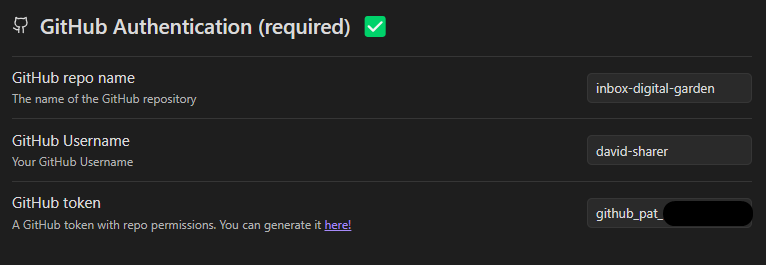
- Configure required options
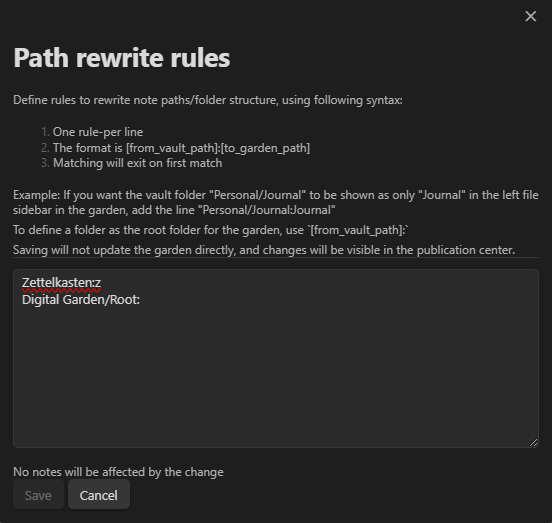
- You'll probably also want to configure rewrite rules.
Set up items to publish
Create a home page note:
---
dg-home: "true"
dg-publish: "true"
---
I am a home page. Beep Boop.
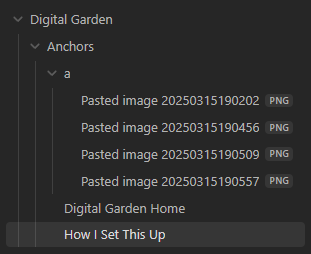
I have structured my root pages like so:
Mark other pages to publish
- Open a page
Ctrl+P=>Digital Garden: Publish Single Note
Publish them
Open the Digital Garden Publication Center.
It's the leaf-looking icon in the side-nav. You can also Ctrl+P => Digital Garden: Open Publication Center

...

References:
- 01 Getting started on their docs site
- README's Initial Setup on their github repo
- Fine grained access token on their docs site